01

Industry value chains

See your business the way it creates value. Start from your industry's value chain, stage by stage, with the capabilities that run each one. Change it to fit how your business really works.

  • Value chains for 18 industries, plus a generic one
  • Each stage lists the capabilities that serve it
  • Support activities shown beneath every stage
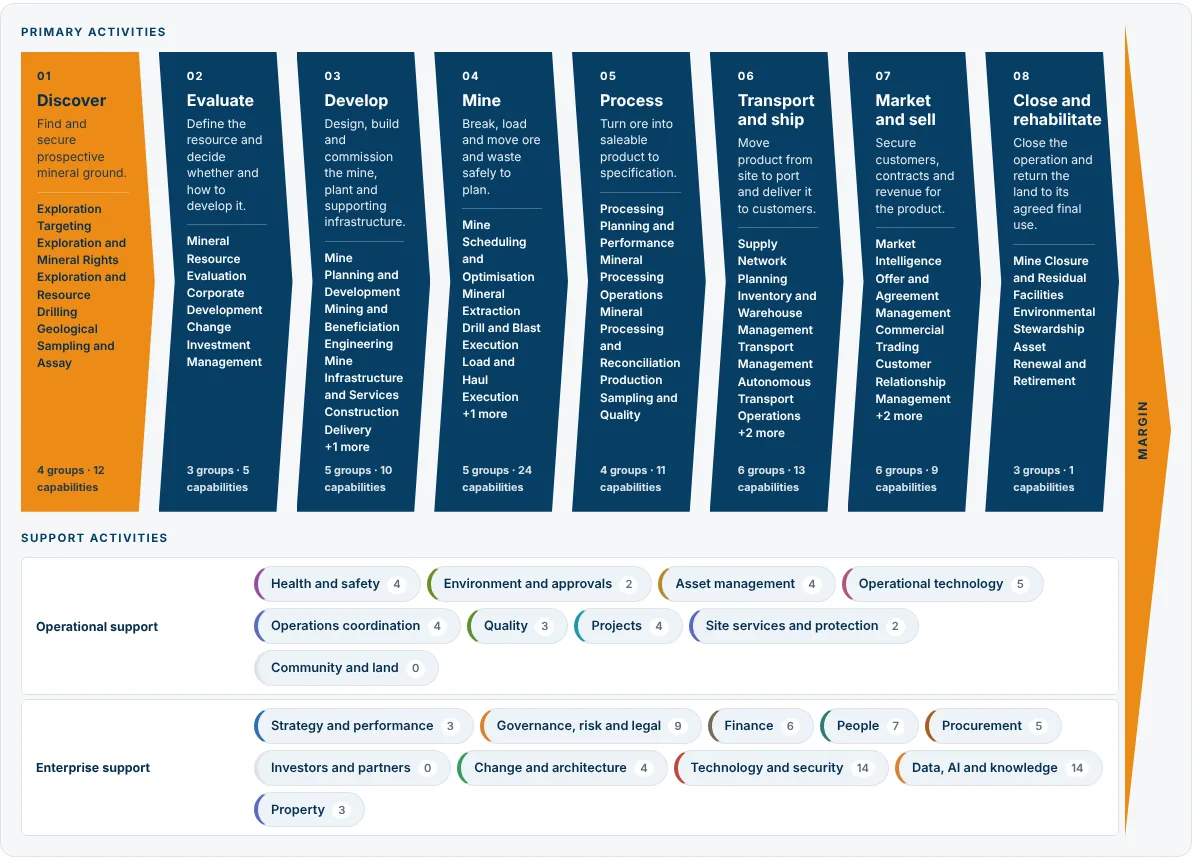
Mining value chain: eight primary stages from Discover to Close and rehabilitate, each with its capabilities, and the support activities beneath

02

Capability maps

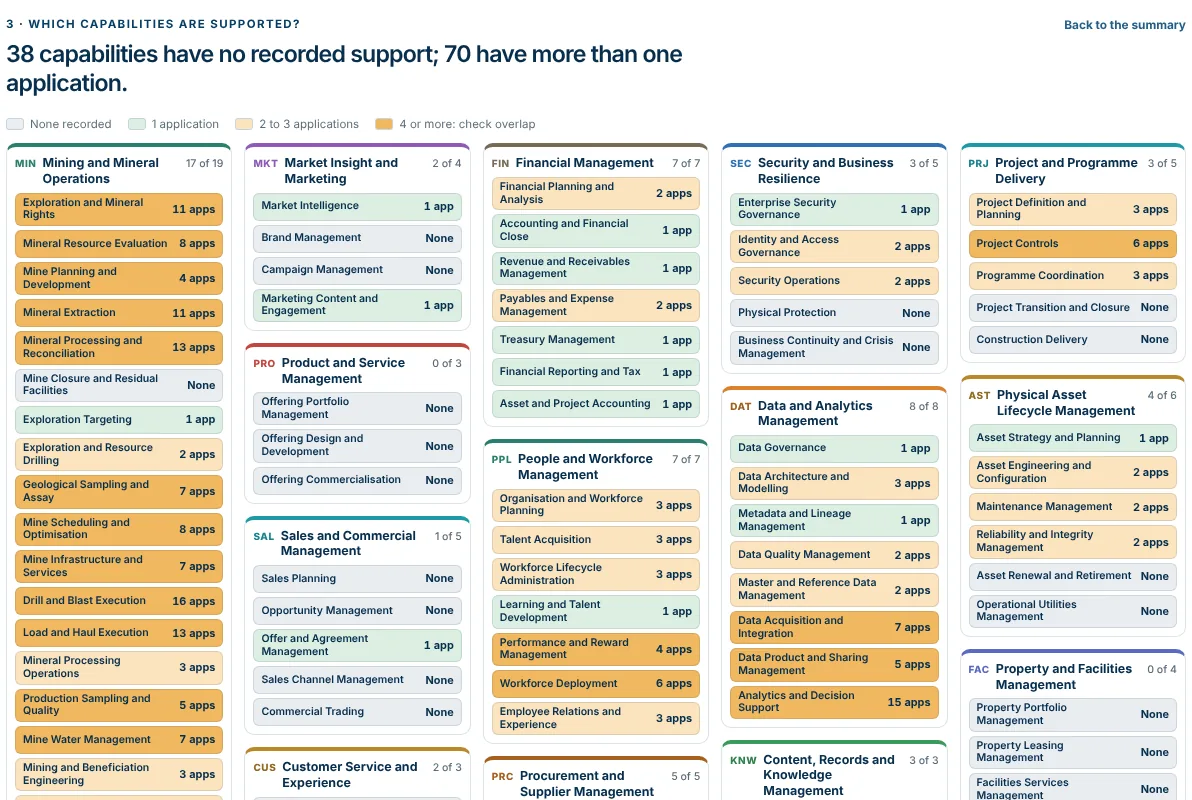
What your business does, and what supports each part. Every application is mapped to the capabilities it supports. The map shows the gaps, the overlaps and where the money sits at a glance.

  • Colour by coverage, cost, risk, renewals or target state
  • Overlaps and unsupported capabilities stand out
  • A standard capability model, tailored to your business
Capability map by domain, each capability coloured by how many applications support it

03

Application database and import

Pull in your own data. Load the extracts and spreadsheets you already have. EVC keeps one record per application, and loading again merges rather than duplicates.

  • Excel, CSV or an ArchiMate exchange file
  • Re-imports match by ID, or by name and vendor
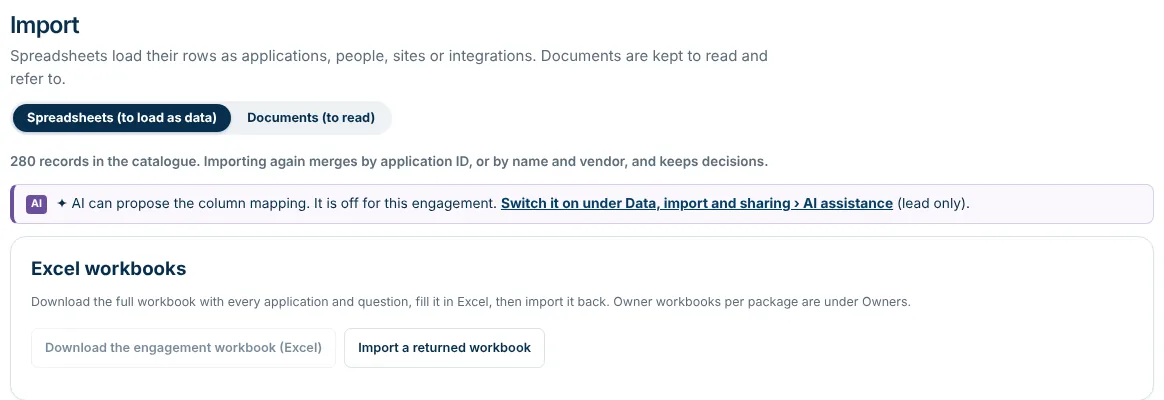
  • One workbook out, filled in, and back in
The import screen: 280 records in the catalogue, and the Excel workbook to fill in and import back

04

Owners confirm on their phone

Four quick questions for each application. Your application owners get a link and confirm what your records already say. They change only what is wrong, in minutes, on any device.

  • A link by email: nothing to install, no long survey
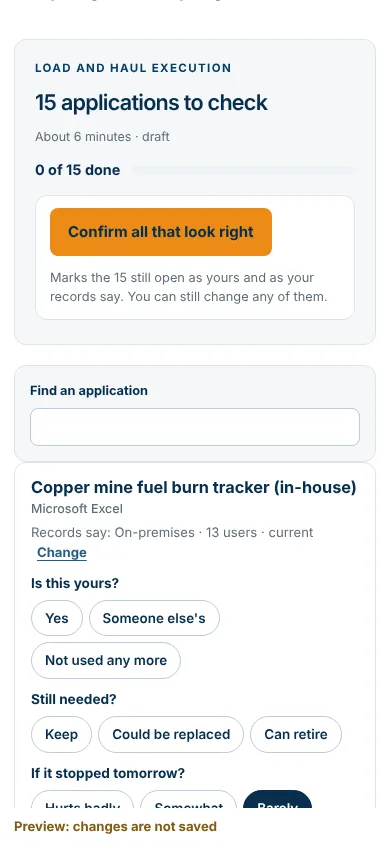
  • "Confirm all that look right" in one tap
  • Every answer saves as they go
The owner page on a phone: 15 applications to check, with Is this yours, Still needed and If it stopped tomorrow questions

The owner page at phone size

05

Technology and OT mapped to capabilities

Your plant systems, in the same picture as IT. Operational technology sits beside your business applications: where each system sits in the control hierarchy, its security zone, and what needs action.

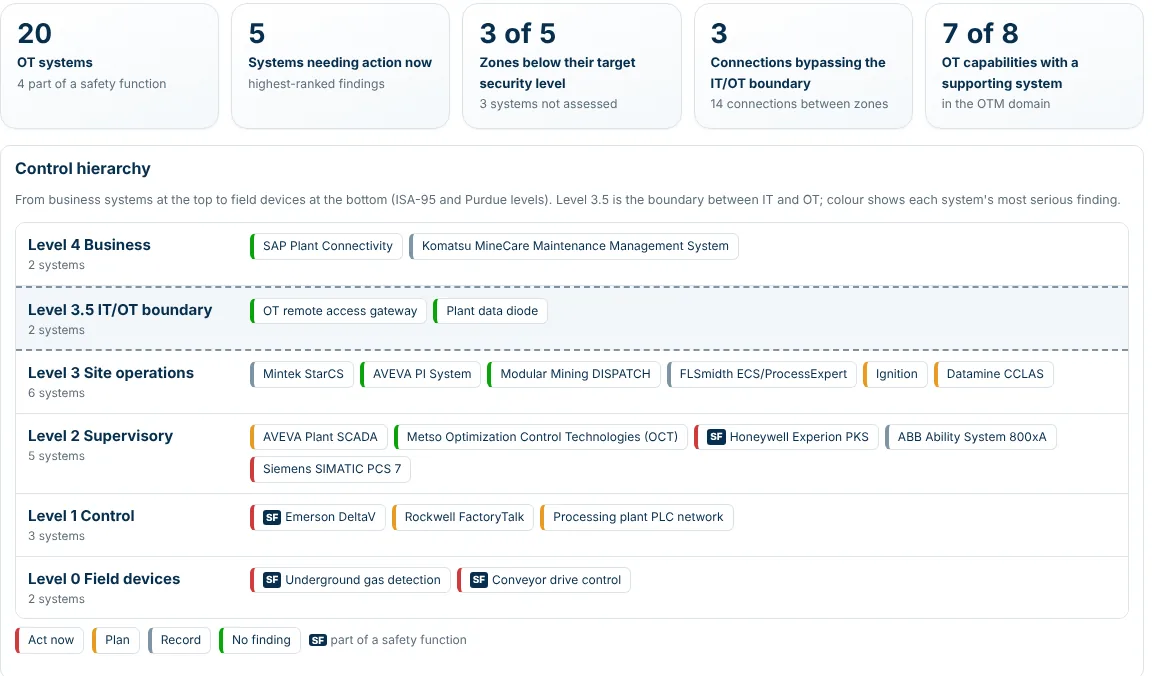
  • Control levels from field devices to business (ISA-95, Purdue)
  • IEC 62443 zones against their target security level
  • Connections that bypass the IT/OT boundary flagged
Plant systems: summary figures and the control hierarchy, with 20 OT systems placed from field devices to business level

06

Assess: duplicates, savings, risk

Which applications to keep, and what changing them saves. EVC finds the applications doing the same job, works out the saving with its basis shown, and puts each one on a keep-or-change board.

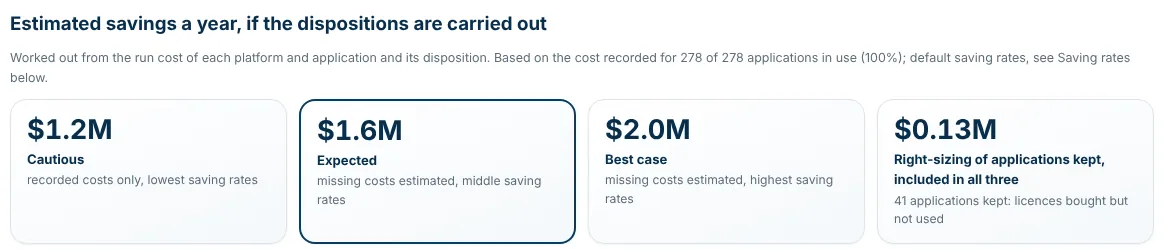
  • Cautious, expected and best-case savings a year
  • Business and technical fit, side by side
  • Risk and renewals shown against the capability they affect
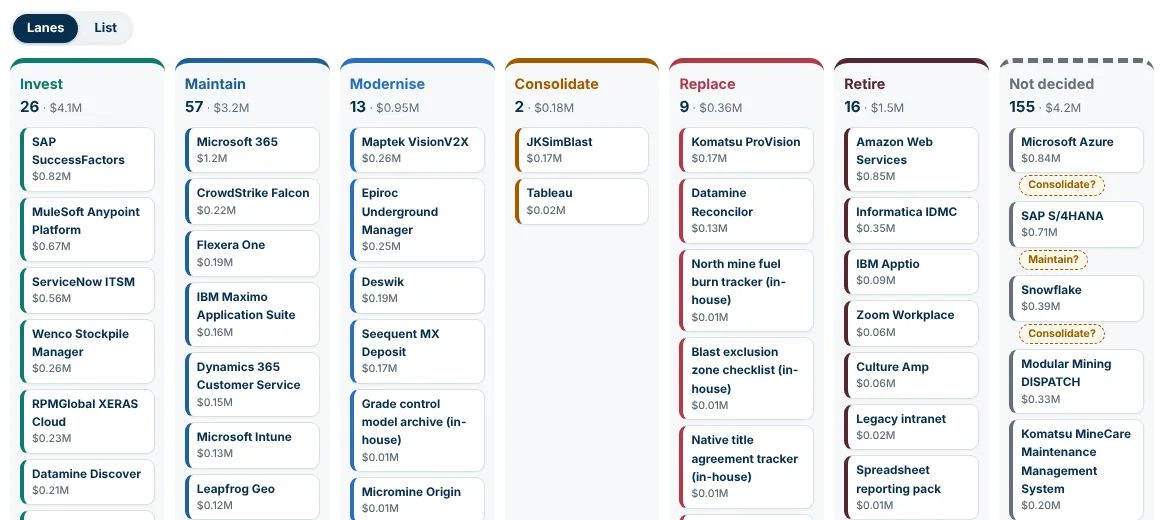
Keep or change board: lanes for invest, maintain, modernise, consolidate, replace and retire, with run costs
Estimated savings a year: $1.2M cautious, $1.6M expected, $2.0M best case

07

Future state and roadmaps

From today to target, in stages you can afford. Set the target for each capability, then plan the epics that get you there. Each one is tested against your objectives, contracts and capacity.

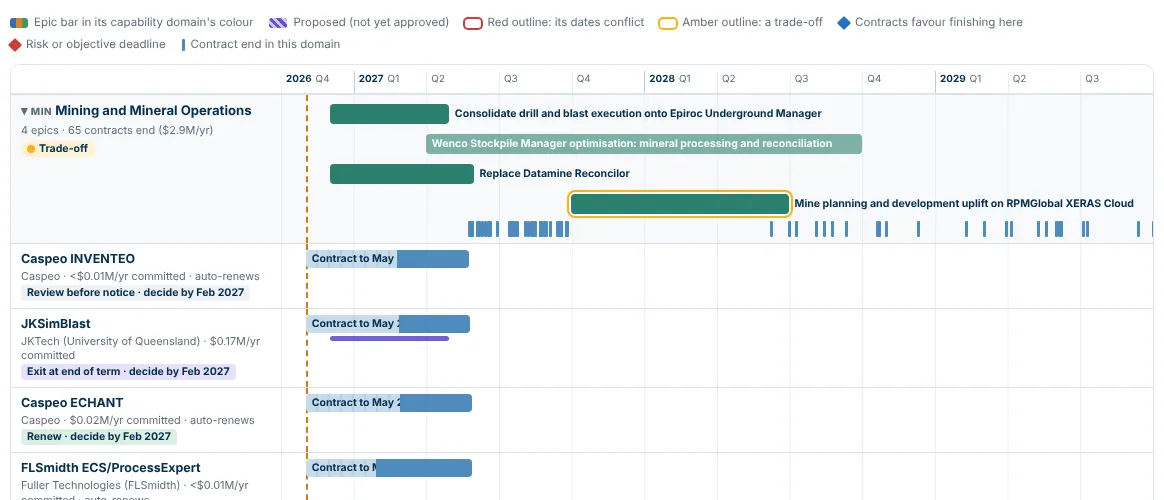
  • Timeline by domain, with the contracts ending in each
  • Epics checked for timing conflicts and trade-offs
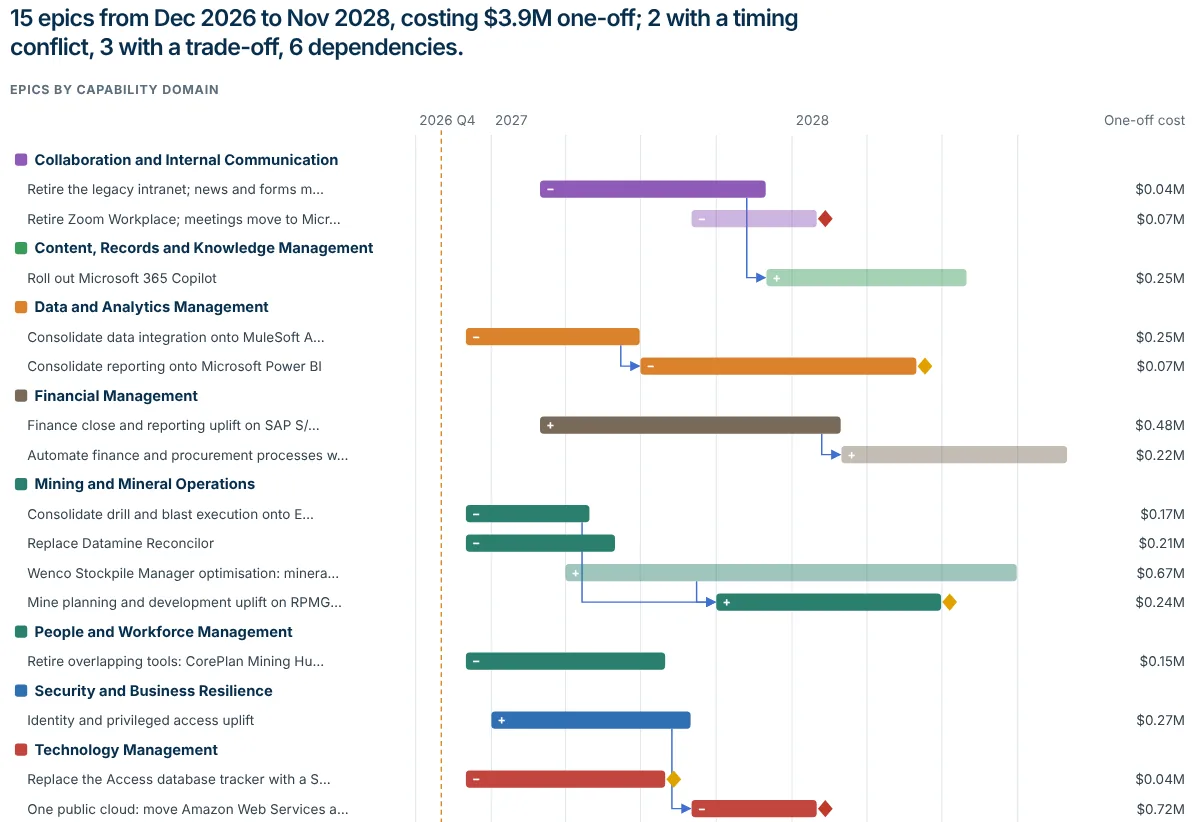
  • Dependencies between epics drawn as arrows
Roadmap timeline for Mining and Mineral Operations: four epic bars across 2027 and 2028, with the contracts ending in that domain
Report roadmap: 15 epics by capability domain from late 2026 to 2028, with dependency arrows, timing conflicts and trade-offs, and the one-off cost of each

08

IT Budget

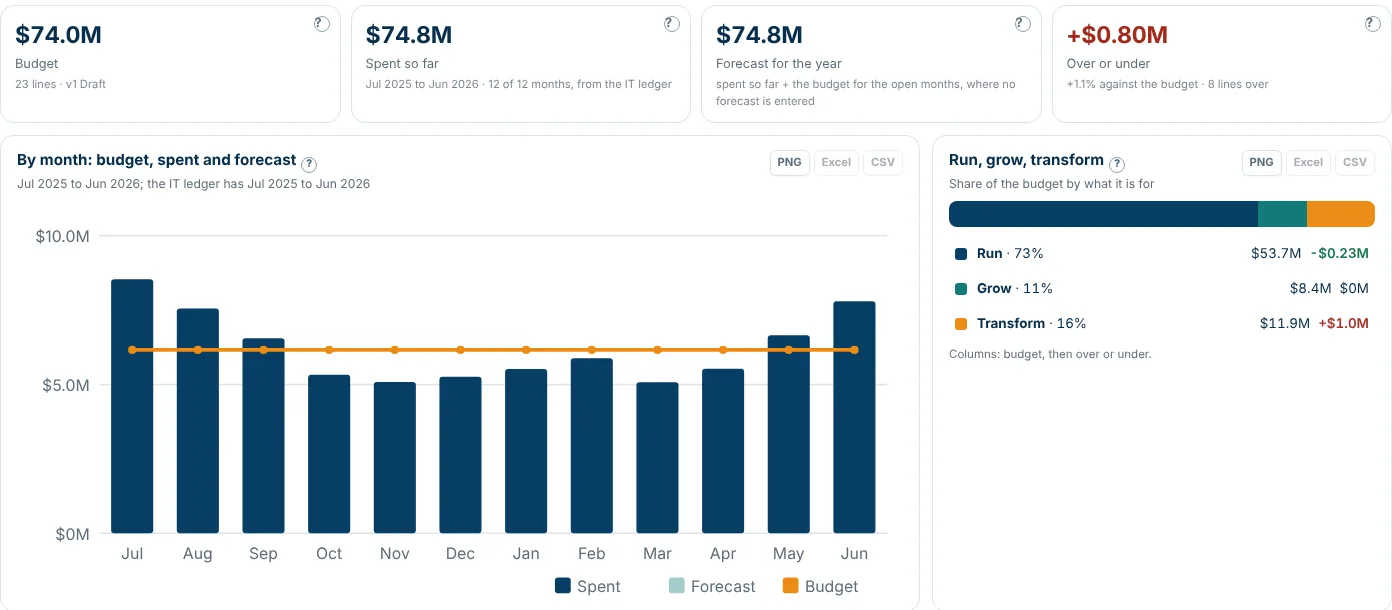
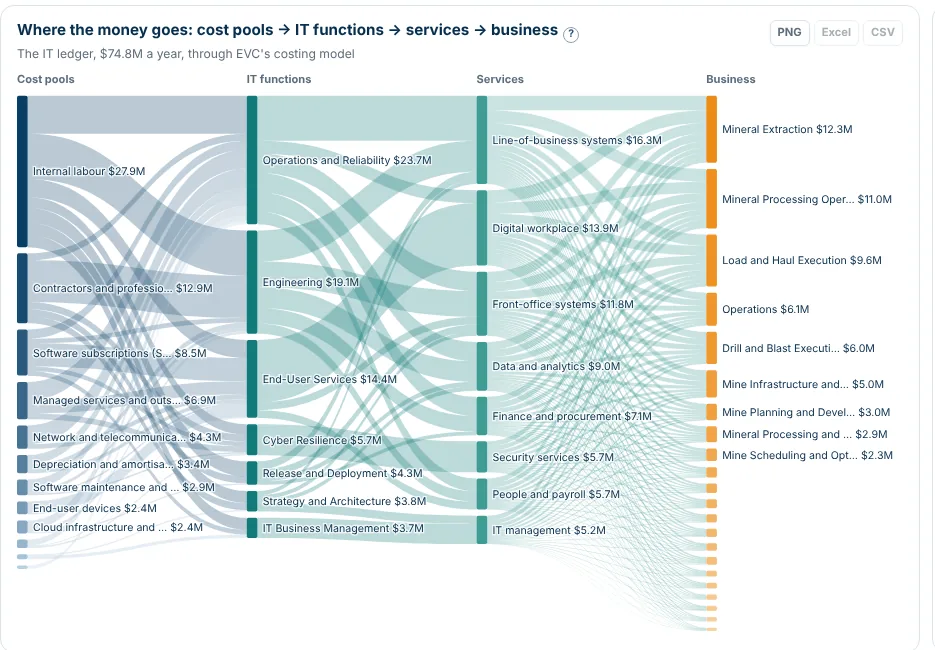
Actuals, forecast, scenarios, and where the money goes. Your IT budget against what has been spent and what is forecast, month by month. Then follow every dollar from cost pool to the business it serves.

  • Budget, spent and forecast, with the variance explained
  • Scenarios side by side before you commit
  • Cost pools to IT functions to services to the business
IT Budget overview: $74.0M budget, $74.8M spent and forecast, monthly chart and the run, grow and transform split
Where the money goes: cost pools flowing through IT functions and services to each part of the business

09

IT Operating Model

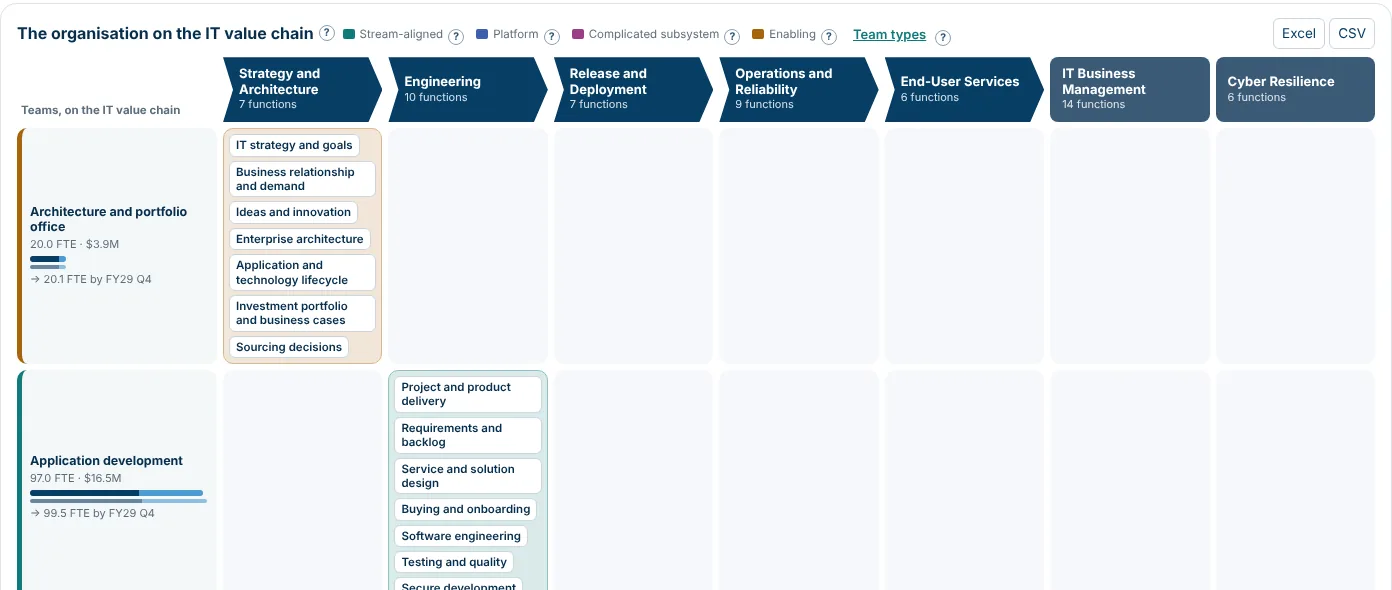
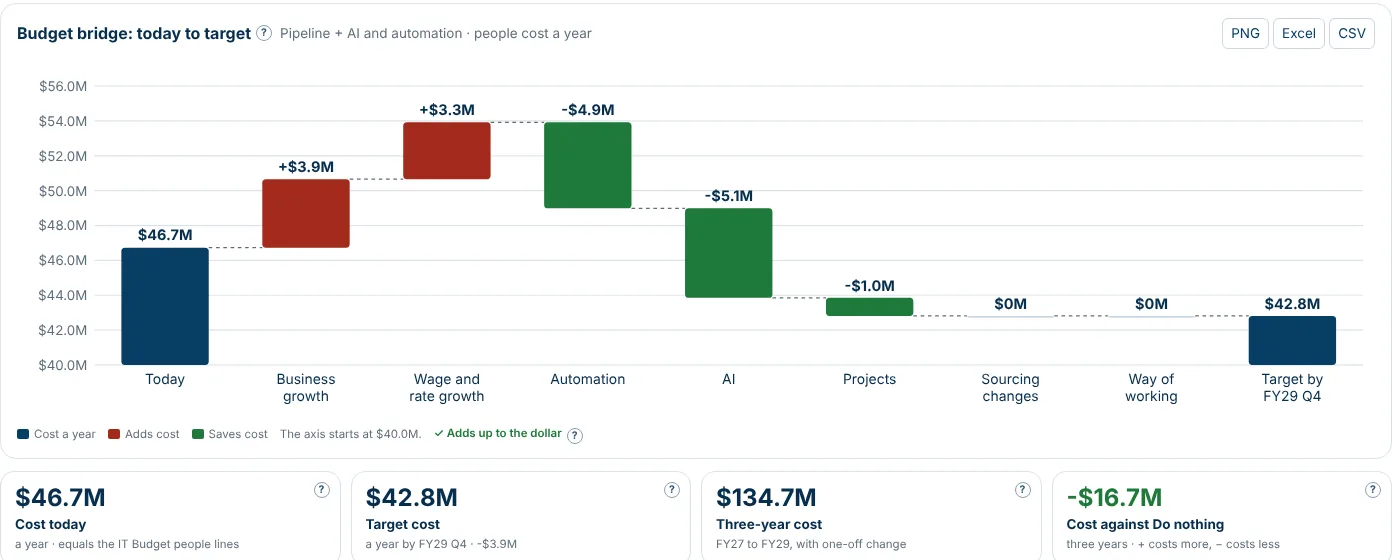
Your IT teams on the IT value chain. See which team does what across the IT value chain, where the gaps are, and what the target organisation costs, including what AI and automation take out.

  • Teams placed on the IT value chain, with FTE and cost
  • Demand against capacity, and the gaps
  • A budget bridge from today to the target
The organisation on the IT value chain: each team and the IT functions it performs, with FTE and cost
Budget bridge from $46.7M today to $42.8M at target, with business growth and wage rises adding cost and automation and AI saving it

10

Architecture governance and patterns

Savings that stay saved. New technology comes in through standards, principles and an architecture review board. Approved patterns show your teams the right way to build.

  • Inbox, agenda, decisions and follow-up for the board
  • 32 reference patterns, each with its diagram
  • Standards, exceptions and architecture debt in one place
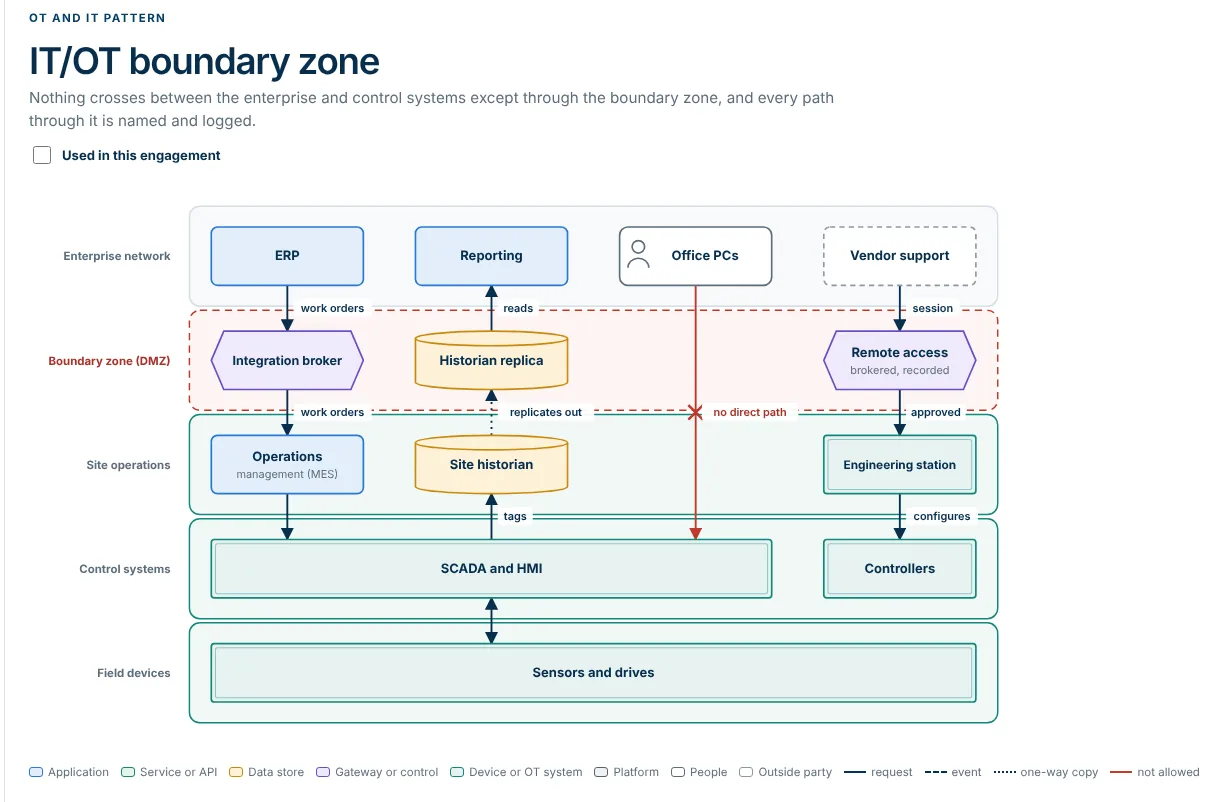
The IT/OT boundary zone pattern: a diagram of enterprise network, boundary zone, site operations, control systems and field devices

11

Reporting and presenter mode

A board-ready report, straight from your data. The report writes itself from what is in EVC: what was found, what is asked for and what happens next. Present it on screen, or save it as a PDF.

  • Presenter mode, one section a slide
  • Globe and map of where you operate
  • Excel dataset and PDF in one click
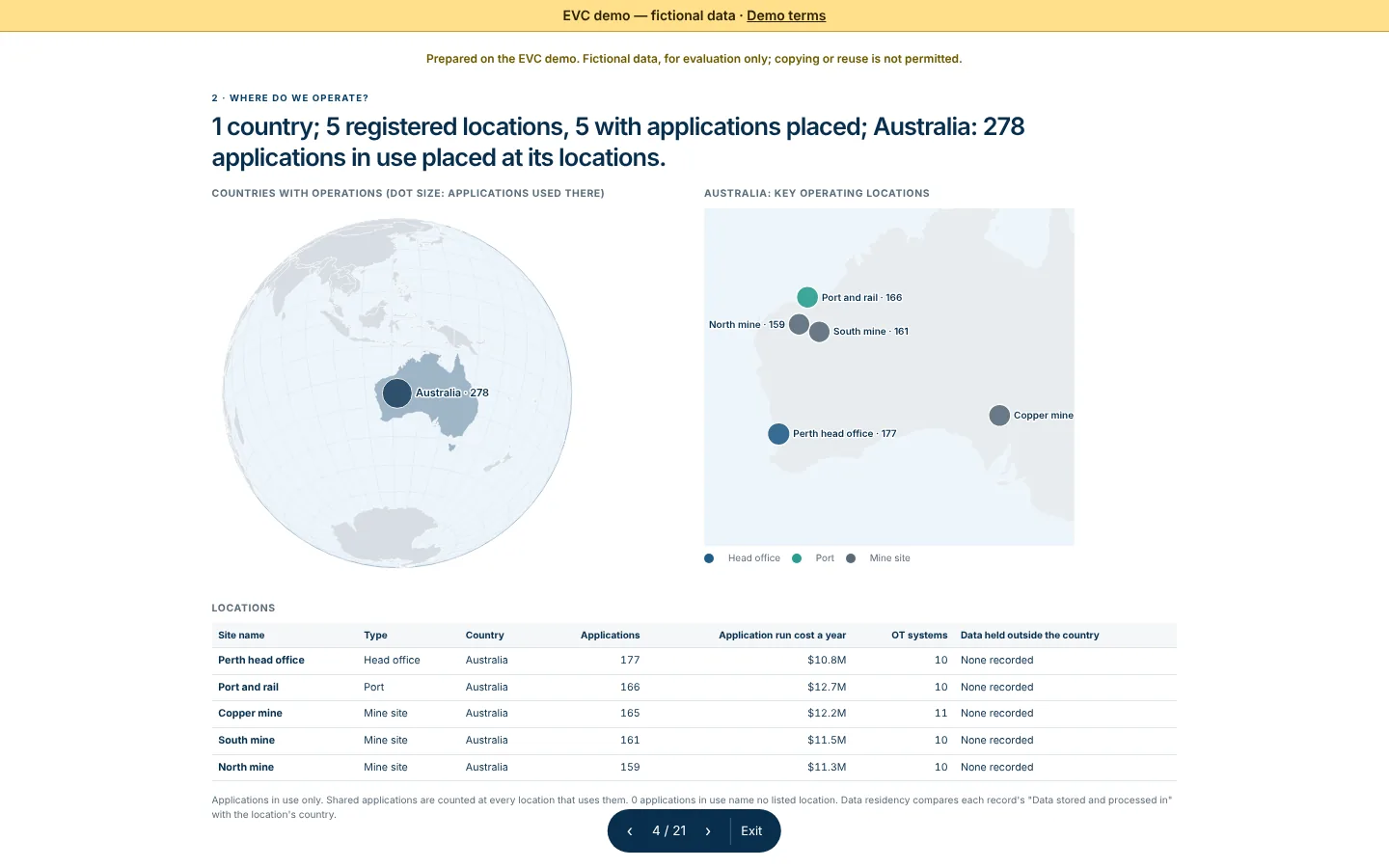
The report in presenter mode: countries with operations on a globe, key locations on a map and a table of sites

12

Export to architecture tools

Take it into the tools you already use. Your capability model, applications and roadmap leave EVC in the formats your architecture and service management tools read.

  • ArchiMate exchange file for Archi, Sparx EA or BiZZdesign
  • Import files for LeanIX and ServiceNow CSDM
  • ArchiMate views to check before you export
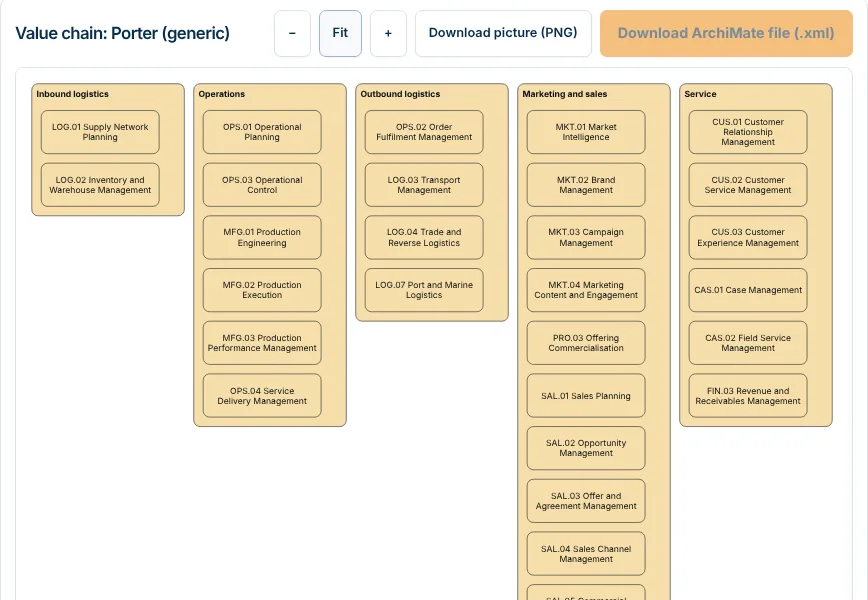
An ArchiMate view of the value chain, drawn from the same layout as the exported file

13

Optional AI

Off by default. Switched on only with your approval. AI can suggest capability links and column mappings, but it stays off until you approve it. Before you do, you see exactly what would be sent and what is removed.

  • Off by default, switched on per engagement with a recorded approval
  • Owner names, email addresses and costs are not sent
  • Every AI result is a proposal a person accepts or dismisses
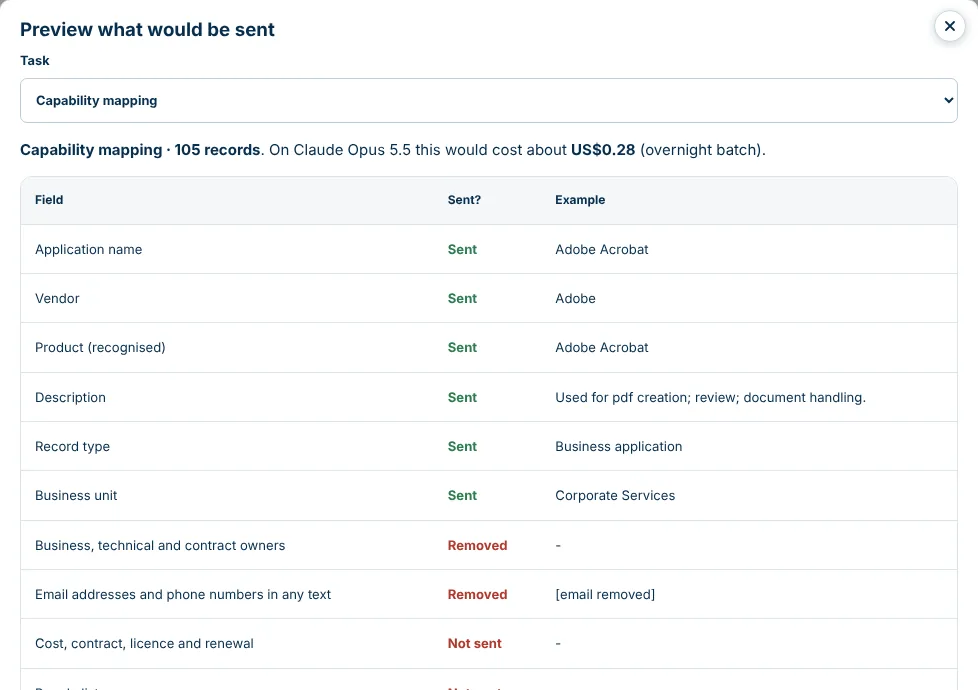
Preview what would be sent: for each field, whether it is sent, removed or not sent, with an example

14

Secure, in your region

Your instance. Your data, hosted in your region. EVC runs as your own instance, with your data hosted in your region. Each person has their own access, and every change is recorded.

  • Your own instance, not a shared workspace
  • Per-person access and roles
  • An audit trail of who changed what, and when

See it on your own portfolio.